

Assignment Submission
Submitted by
Tanishka Bilgaiyan
Problem
Scattered Inspiration
Planning a trip rarely happens in just one app. We get inspired scrolling Instagram, save a reel here, screenshot a blog there, and drop links into messy group chats. But when it's time to actually sit down and build a plan, all that great inspiration is scattered everywhere.
My Assumptions
The User
Assumptions I made
Users don't want to manually copy-paste links into a generic notes app; they want frictionless saving natively from the apps they are already using (like Instagram).
Planning is often collaborative, so the workspace needs to support a multiplayer mode.
A standalone "planning only" app struggles with monetization, so this feature ("Canvas") lives inside a travel booking ecosystem to drive revenue through stays and experiences.
While many travel apps target a specific niche, I designed this to be flexible enough for almost anyone. Because the AI acts as a personalized assistant, it tailors the final itinerary and suggestions based on exactly what the user saves. It adapts to the user's specific needs—whether they are a solo backpacker or someone organizing a group trip.
Concept
Canvas
I designed Trip Canvas, an intelligent moodboard integrated into a travel booking app. Instead of forcing the user into a rigid day-by-day planner right from the start, Trip Canvas allows them to just "dump" heterogeneous data (Links, Images, Notes, and even local Contacts). Once they're ready, AI synthesizes this brain-dump into a structured, personalized itinerary.
Solution
Frictionless Capture
Discovery mostly happens off-platform. I utilized the native iOS Share Sheet so users can send Instagram reels or web links directly to their TripCanvas without breaking their doom-scrolling flow.


For on-platform actions, a central floating action button allows quick addition of distinct data chips: Locations, Contacts, Links, Images, and Notes.
Organize & Synthesize
The Canvas acts as a visual repository. I categorized data into clean chips and cards so it feels like a structured moodboard rather than an overwhelming text document.


Realizing that local intel (a driver's number, a guide's WhatsApp) is crucial but easily lost, I added a specific module to save Contacts directly to the trip space.
AI to Actionable Itinerary
Staring at a blank itinerary is daunting. By clicking "Make Itinerary," the app simply asks for basic constraints (People, Dates) and uses the saved Canvas context to generate a thoughtful draft.


Business Value
The generated itinerary integrates "Book Now" CTAs for stays and experiences. Because the AI knows what the user liked and saved, it suggests highly relevant inventory, driving conversions.
Collaboration & Sharing
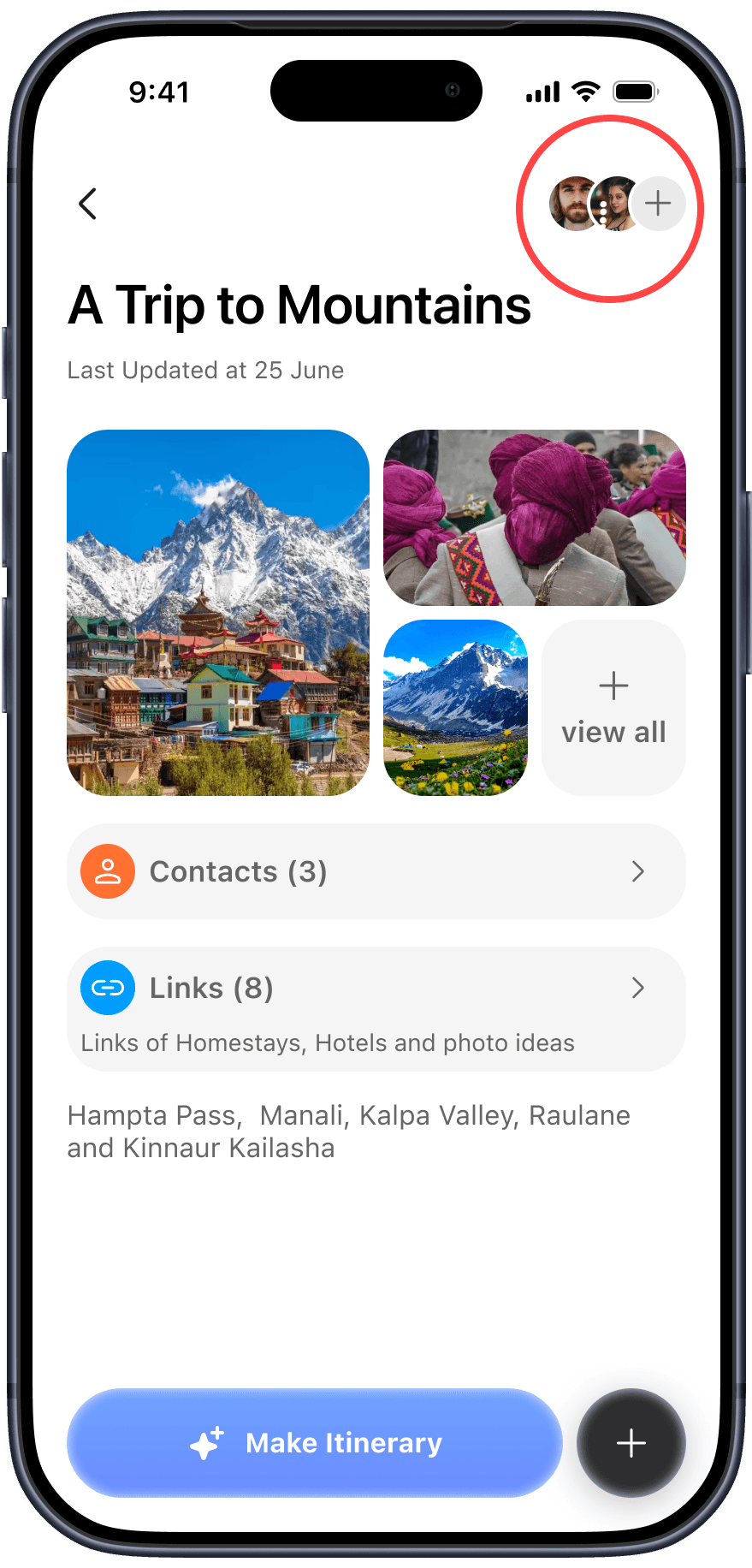
Planning is rarely a solo activity. On the top right of any Canvas page, users can tap the "add people" icon to invite friends. Anyone invited can jump in to view or edit the Canvas.
The final itinerary lives entirely within the app rather than being exported out. I made this call because the app holds the actual actionable data—hotel bookings, live reminders, saved guide contacts, and dynamic maps. Exporting it would lose that magic.
References & AI Disclosure
Inspiration References:
Structured: Inspired the core concept of having a place to dump unorganized ideas and structure them later.
Notion & Apple Notes: Influenced how the app handles saving practically anything (text, images, links) and structuring it cleanly with chips/blocks.
Airbnb & Apple HIG (iOS 26): Guided the visual aesthetics to ensure the UI feels native, clean, and trustworthy.
AI Disclosure:
I used Gemini to help rewrite and refine the copy for this presentation.
I used Mobbin to study existing design patterns and for visual inspiration.
The core product thinking, user flows, and all UI design decisions were my own.
Thank you!!!